
What is Power BI? (Explained in Plain English – 2026 Guide)
Power BI is a business Intelligence tool that lets you get information much faster than using an Excel spreadsheet. It’s perfect for reporting via website or phone to executives and sales teams, tracking “KPIs” (your most important numbers) for management, and understanding exactly where delays are happening in your business.
Reports are quickly and easily built for fast data analysis and can have preprogrammed data transformations in the background that help you automate complex excel reports into quick and accessible reports.
1. Why use this instead of Excel?
Most people are used to Excel, but as a business grows, spreadsheets become a headache. You end up with dozens of files, “Version 2,” “Version 2-FINAL,” and nobody knows which one is right.
Power BI changes the game because:
- It’s Automatic: You don’t have to spend all Monday morning copy-pasting data. Power BI connects to your files and updates your charts by itself.
- It’s Interactive: In Excel, a chart is just a flat picture. In Power BI, you can click on a “Region” or a “Month,” and the whole screen changes to show you the details for that specific choice.
- It Spots the “Wait”: For management, the biggest win is seeing delays. Whether it’s a late shipment or a project that’s stuck, Power BI highlights the problem in red before it costs you serious money.
2. Who is Power BI for?
You don’t need to be a “data scientist” to use this. There are usually three types of people using the tool:
The “Decision Makers” (Executives & Managers)
These people just want the bottom line. They open a dashboard on their phone or laptop to see if the business is making money and where the bottlenecks are. They use it to stop guessing and start leading.
The “Action Takers” (Sales & Staff)
These are the people on the ground. A salesperson might use Power BI to see which customers haven’t ordered in a while. A supervisor might use it to see which staff members are overloaded.
The “Builders” (Report Developers)
These are the people who take the “messy ingredients” (the raw data) and cook them into the beautiful, easy-to-read charts everyone else uses.
Master the Build: If you want to be the person who creates these tools rather than just looking at them, [Follow my Developer Training here]. I’ll show you how to go from a blank screen to a professional reporting system.
3. How does it work? (The 3-Step Process)
You can think of Power BI like a factory for your information:
- The Input: It “reaches out” and grabs data from everywhere—your Excel sheets, your website, or your company database.
- The Sorting: It cleans up the mess. It fixes mistakes, links different files together, and makes sure the numbers actually add up.
- The Result: It creates the “Dashboard.” This is the interactive screen where you can finally see your information clearly.
4. Real-World Examples: Power BI in Action
How will you actually use this on a Tuesday afternoon?
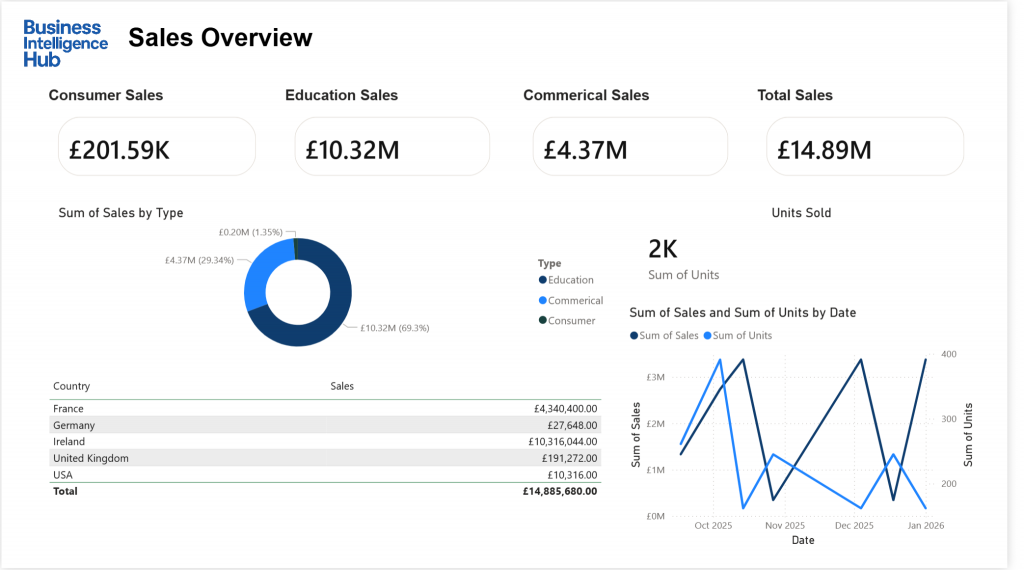
- Reporting to Execs: Instead of a 20-page slide deck, you show them one screen. They can ask a question, you click a button, and the answer appears instantly.
- Tracking Sales: You can see exactly which products are flying off the shelves and which ones are just taking up space.
- Fixing Delays: If you run a warehouse or a project, you can see exactly where things are “stuck.” You can see the delay happening in real-time and call the right person to fix it.
5. Is it hard to learn?
For most people, using it is as easy as using a website. If you can click a mouse, you can use a Power BI report.
For those who want to build reports, it feels like “Excel on steroids.” It takes a little practice to learn how to link data together, but once you do, you can do things in minutes that would take weeks to do manually in a spreadsheet.
Conclusion
Power BI isn’t just about “pretty pictures.” It’s about speed and certainty. It takes the stress out of reporting because you always have the answer right in front of you. It’s the fastest way to understand your business and make sure everything is running exactly as it should.